
To make our device truly useful we need to add wireless communication. The prime feature of the Nordic Semiconductor devices is their 2.4 GHz radio and their protocol stack which allows them to communicate using Bluetooth Low Energy (BLE), Zigbee, Ant, Thread or WiFi. In this post we will set up Bluetooth Low Energy communication with the device and take the first step toward getting sensor readings into Home Assistant.
Wireless communication
The wireless communication technologies of interest for our use case are the ones designed for Internet of Things (IoT) device communication; Zigbee, Thread and Bluetooth Low Energy. In my home automation system I have Zigbee devices and they work fine. The support in Home Assistant is also great. Thread is an upcoming and interesting protocol in this context. But because it is a new protocol I fear that I will run into too many issues that will sidetrack the project. Bluetooth Low Energy (BLE) is a well established and proven protocol. There are plenty of resources available for learning about the protocol and how to implement the communication using Rust. BLE is the right tool for connecting a sensor to Home Assistant.
Nordic Semiconductor has a Bluetooth Low Energy - Fundamentals course on their DevAcademy learning site. It provides a practical guide for the core parts of the Bluetooth protocol together with hands-on exercises using their nRF Connect SDK. The SDK is C-based and so are the exercises in the course, but they are well explained and one can follow along without having to brush up on one's C programming skills. I recommend this course if you don't have that much experience with BLE.
There is as of this writing no Bluetooth-qualified Rust native host implementation. For Rust you have the option to use the nrf-softdevice crate that provides Rust bindings for Nordic Semiconductor's nRF SoftDevice firmware. Another option is to use the TRouBLE crate from the Embassy project. The TrouBLE crate with its native Rust API offers a better experience than the nRF SoftDevice C-bindings. Checking out the current supported features and their working examples, TrouBLE is the right path for this project.
Bluetooth 101
In this project we are making a device that can be discovered by Home Assistant and that is able to expose the value of the CO2 sensor readings to it.
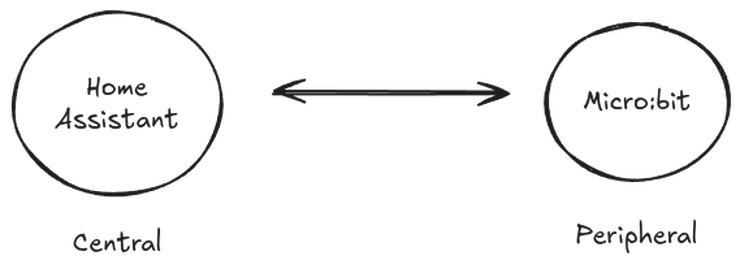
The devices in a Bluetooth network take different roles and the figure above illustrates our network with the devices and their role. The roles are specified in the Bluetooth specification and the two that are relevant for us are the central and the peripheral role. Our Micro:bit is the peripheral and it will, as is expected from a device with the peripheral role, periodically send out packages to let other devices know of its presence. This is called advertising. The computer running Home Assistant will take the central role and it will scan the advertising frequencies looking for peripherals advertising their presence. When a package is received it will decide what action to take based on the packet type. The type our Micro:bit will transmit tells the central that it will accept connections.
Sharing the sensor readings is done through a service with characteristics. The Bluetooth specification defines a protocol for exchanging attributes, think of them as key-value pairs. This is the Attribute Protocol (ATT). Using this protocol the Generic Attribute Profile (GATT) adds hierarchy and structure in a way that allows us to define higher order services.
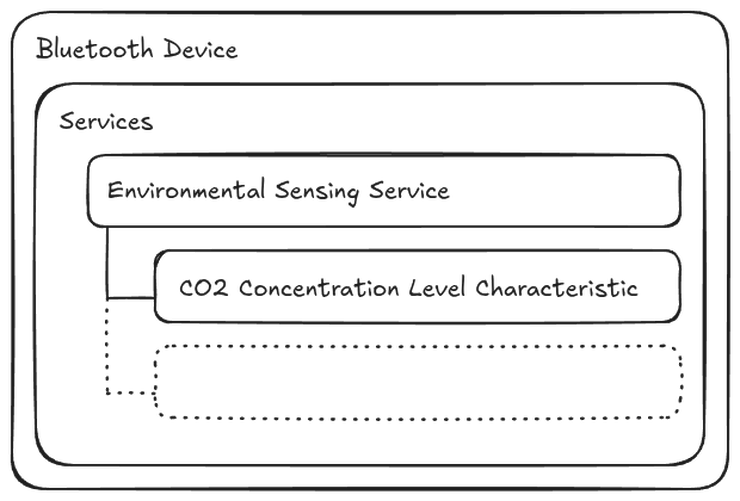
There are many different services already specified that we can use, which is great for interoperability. We will make use of one of these services to provide the CO2 concentration level by implementing the Environmental Sensing Service. The measurement value will be one of the characteristics, or key-value pairs if you will, that is part of the service.
There is a lot more to Bluetooth LE, but this is sufficient knowledge to make sense of the TrouBLE API and proceed with the implementation. I encourage you to work through the Bluetooth LE Fundamentals course and have a look at the Bluetooth specification to learn more.
Hello TrouBLE
The TrouBLE project provides a lot of examples on using the crate for different use cases and different platforms. One of the examples matches very well with our mission. It shows an implementation of a peripheral device that advertises a service for reading the battery level of the device. This is a useful service for our device as well. The first step into TrouBLE is to implement this example in the project and then add a service for the CO2 concentration level in a similar way.
// Battery service
#[gatt_service(uuid = service::BATTERY)]
struct BatteryService {
#[descriptor(uuid = descriptors::VALID_RANGE, read, value = [0, 100])]
#[descriptor(uuid = descriptors::MEASUREMENT_DESCRIPTION, read, value = "Battery Level")]
#[characteristic(uuid = characteristic::BATTERY_LEVEL, read, notify)]
level: u8,
}The code snippet above shows the declaration of the Battery Service and below is the declaration of the Environmental Sensing service that enables reading the CO2 concentration level from our SCD40 sensor:
// Environmental Sensing service
#[gatt_service(uuid = service::ENVIRONMENTAL_SENSING)]
struct EnvironmentalSensingService {
#[descriptor(uuid = descriptors::MEASUREMENT_DESCRIPTION, read, value = "CO2 Concentration")]
#[characteristic(uuid = characteristic::CO2_CONCENTRATION, read, notify)]
co2_concentration: u16,
}After the BLE task has been spawned by Embassy it runs a loop that alternates between advertising its presence and serving the connection from a central device that connects to it:
let _ = join(ble_task(runner), async {
loop {
match advertise("Rusty Sensor", &mut peripheral, &server).await {
Ok(conn) => {
// set up tasks when connection is established so they don't run when no one
// is connected
let event_task = gatt_event_task(&server, &conn);
let battery = battery_task(&server, &conn, &stack);
let environmental = environmental_task(&server, &conn, &stack, scd_sensor);
select3(event_task, battery, environmental).await;
}
Err(e) => {
#[cfg(feature = "defmt")]
let e = defmt::Debug2Format(&e);
panic!("[ble/adv] Error: {:?}", e);
}
}
}
})
.await;The battery_task only provides a fake value to the client for now, but the environmental_task
starts periodic measurements on the SCD40 and notifies the client every time the measurements are
read.
loop {
match scd_sensor.get_measurement().await {
Ok(measurement) => {
if concentration.notify(conn, &measurement.co2).await.is_err() {
error!("[ble/environmental_task] Error notifying connection");
break;
}
}
Err(_) => {
error!("[ble/environmental_task] Error reading measurement");
}
}
Timer::after_millis(ScdSensor::INTERVAL_MS.into()).await;
}The implementation is rough, but it works - we can connect and read the CO2 value. We can test this using the nRF Connect for Mobile app:
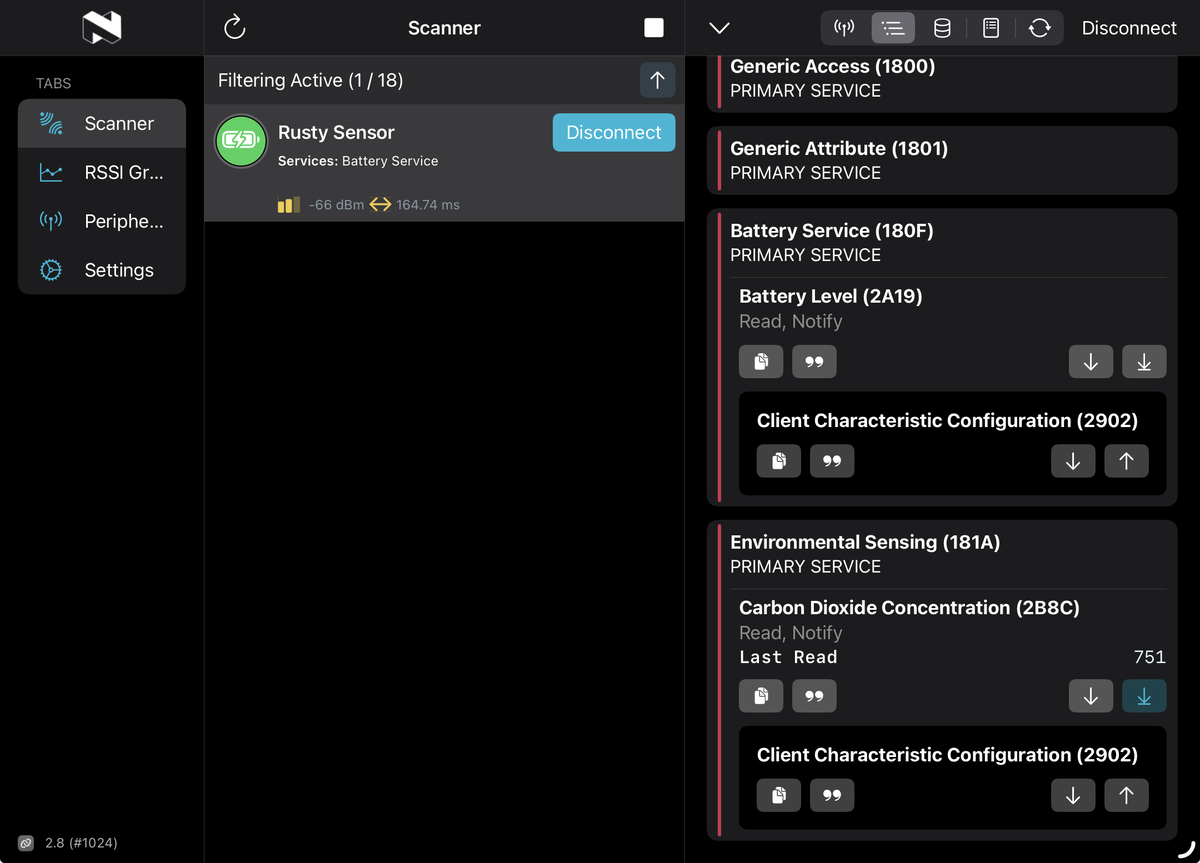
Getting Bluetooth communication to work is a great milestone for the project! There are, however, plenty of things left to tackle. The device for some reason panics when disconnecting and connecting Bluetooth again. There is also an issue where the Environmental Sensing service only shows up for some clients. But these are challenges for another day.
Thank you for reading!