
To program the Micro:bit we first need to make sure we have the development environment set up correctly. Setting up the environment consists of two parts. We need to make sure Linux recognizes the device correctly and give it the correct tag. Without the correct tag, we can not write to the device as an unprivileged user. Then, we need to set up our development environment with the tools needed to compile and write our Rust project to the device.
Adding a udev rule
Linux recognizes the Micro:bit as a USB mass storage device when connected to
the computer. This should work out of the box, but we cannot write to the
device as an unprivileged user. For this to work we need to add a udev rule that adds
the uaccess tag when the device connects to the computer. I’m using NixOS as my Linux
distribution and declaring my configuration using Nix Flakes. The udev rule go in
its own file that I import into the configuration of the host that
the Micro:bit connects to:
{
pkgs,
...
}: {
config = let
microbit-rules = pkgs.writeTextFile {
name = "69-microbit.rules";
text = ''
ACTION!="add|change", GOTO="microbit_rules_end"
SUBSYSTEM=="usb", ATTR{idVendor}=="0d28", ATTR{idProduct}=="0204", TAG+="uaccess"
SUBSYSTEM=="tty", KERNEL=="ttyACM*", TAG+="uaccess"
LABEL="microbit_rules_end"
'';
destination = "/etc/udev/rules.d/69-microbit.rules";
};
in {
services.udev.packages = [ microbit-rules ];
};
}In the snippet above, lines 9-12 show the udev rule. We declare the
/etc/udev/rules.d/69-microbit.rules file as the destination for our rule on
line 14. And lastly on line 17 we add the rules file to the udev packages to enable it.
The udev rule addresses two Linux subsystems, the USB and the TTY subsystem.
We need this because the Micro:bit provides both a USB mass storage device
endpoint and a serial interface. If we look at the electrical
diagram
of the Micro:bit we see that the board actually have two microcontrollers. The
nRF52833 serves as the main microcontroller, but the board also features a NXP
MKL27Z256VFM4 microcontroller that sit between the computer and the main
microcontroller. This microcontroller provides the interface to the board and
handles programming of the nRF52833. It also provides the debugging probe and
the UART-to-USB interface. On line 10 we set the rule for the USB subsystem,
matching on vendor and product ids of the NXP chip. Then on line 11 we set the
rule for the serial interface. With these rules in place the user can program
the device as well as access the debugging probe and the UART-to-USB interface.
After activating the configuration we can verify that the configuration works
as intended. We first spawn a nix-shell with the usbutils package. After
plugging in the device with the USB cable we list all the USB devices. We do
this with lsusb and then grep for the Micro:bit which shows up with the
name NXP ARM mbed:
> nix-shell -p usbutils

> lsusb | grep "NXP ARM mbed"
Bus 001 Device 024: ID 0d28:0204 NXP ARM mbed
This tells us the bus and device ids where we can find the device file. By looking up the access control list of the device file we can verify that the rules work as intended:
> ls -l /dev/bus/usb/001/024
crw-rw-r--@ 189,23 root  6 Jul 07:46 /dev/bus/usb/001/024

> getfacl /dev/bus/usb/001/024
getfacl: Removing leading '/' from absolute path names
# file: dev/bus/usb/001/024
# owner: root
# group: root
user::rw-
user:aj:rw-
group::rw-
mask::rw-
other::r--
With the correct permissions in place we can access the device and query the device with probe-rs:
> nix-shell -p probe-rs
> probe-rs list
The following debug probes were found:
[0]: BBC micro:bit CMSIS-DAP -- 0d28:0204:9904360273554e45004660070000001c000000009796990b (CMSIS-DAP)

> probe-rs info
Probing target via JTAG
-----------------------

Error while probing target: The protocol 'JTAG' could not be selected.

Caused by:
    The probe does not support the JTAG protocol.
Probing target via SWD
----------------------

 WARN probe_rs::architecture::arm::memory::romtable: Component at 0xe0001000: CIDR0 has invalid preamble (expected 0xd, got 0x0)
 WARN probe_rs::architecture::arm::memory::romtable: Component at 0xe0001000: CIDR2 has invalid preamble (expected 0x5, got 0x0)
 WARN probe_rs::architecture::arm::memory::romtable: Component at 0xe0001000: CIDR3 has invalid preamble (expected 0xb1, got 0x0)
 WARN probe_rs::architecture::arm::memory::romtable: Component at 0xe0000000: CIDR0 has invalid preamble (expected 0xd, got 0xb1)
 WARN probe_rs::architecture::arm::memory::romtable: Component at 0xe0000000: CIDR1 has invalid preamble (expected 0x0, got 0x1)
 WARN probe_rs::architecture::arm::memory::romtable: Component at 0xe0000000: CIDR2 has invalid preamble (expected 0x5, got 0xb1)
 WARN probe_rs::architecture::arm::memory::romtable: Component at 0xe0040000: CIDR0 has invalid preamble (expected 0xd, got 0x0)
 WARN probe_rs::architecture::arm::memory::romtable: Component at 0xe0040000: CIDR2 has invalid preamble (expected 0x5, got 0x0)
 WARN probe_rs::architecture::arm::memory::romtable: Component at 0xe0040000: CIDR3 has invalid preamble (expected 0xb1, got 0x0)
ARM Chip with debug port Default:

Debug Port: DPv1, Designer: ARM Ltd
├── V1(0) MemoryAP
│   └── 0 MemoryAP (AmbaAhb3)
│       ├── 0xe00ff000 ROM Table (Class 1), Designer: Nordic VLSI ASA
│       ├── 0xe0001000 Generic
│       ├── 0xe0000000 Peripheral test block
│       ├── 0xe0040000 Generic
│       └── 0xe0041000 Cortex-M4 ETM   (Coresight Component)
└── V1(1) Unknown AP (Designer: Nordic VLSI ASA, Class: Undefined, Type: 0x0, Variant: 0x0, Revision: 0x0)


Debug port version DPv1 does not support SWD multidrop. Stopping here.
This verifies that we can communicate properly with the Micro:bit.
We have successfully completed the first part of the setup.
Development environment
Next we need to set up the Rust toolchain. The book describes which tools we
need, so we need to create the Nix Flake that defines a devshell with the
desired tools. If you do not know Nix and devshells, think of it as a virtual
environment for your project. I prefer to use Numtide's
devshell as it provides a clean and minimal
environment to build upon. I also like to have everything defined in Nix and
do not mix in TOML for the devshell configuration.
The initial template I created as a starting point for the project looks like this:
{
  inputs = {
    nixpkgs.url = "github:NixOS/nixpkgs/nixpkgs-unstable";
    utils.url = "github:numtide/flake-utils";
    utils.inputs.nixpkgs.follows = "nixpkgs";
    devshell.url = "github:numtide/devshell";
    devshell.inputs.nixpkgs.follows = "nixpkgs";
  };

  outputs = { self, nixpkgs, utils, devshell }:
    utils.lib.eachDefaultSystem (system: {
      devShells = rec {
        default = let
          pkgs = import nixpkgs {
            inherit system;
            overlays = [ devshell.overlays.default ];
          };
        in pkgs.devshell.mkShell {
            devshell.packages = [ ];
        };
      };
    });
}
I add this flake.nix file to my project directory together with a basic .envrc
for direnv:
use flakeTogether these files make sure I have the development environment configured correctly every time I enter the project directory:
> cd rust-embedded-discovery
direnv: loading ~/Work/rust-embedded-discovery/.envrc
direnv: using flake
direnv: nix-direnv: Using cached dev shell
🔨 Welcome to devshell
Now we need to add the required tools to the devshell. Thus far I have always relied on the Nix community Fenix project to provide the Rust toolchain. I tried to use it yet again, but this time it did not work with the Micro:bit as the build target. Others who have tried also experienced the same issues, so without digging further into the issue I decided to try another approach. I decided to try to use Oxalica's rust-overlay. This approach got me all the way to success with just a few lines of Nix. The complete Nix Flake looks like this:
{
inputs = {
devshell = {
url = "github:numtide/devshell";
inputs.nixpkgs.follows = "nixpkgs";
};
nixpkgs.url = "github:NixOS/nixpkgs/nixpkgs-unstable";
rust-overlay = {
url = "github:oxalica/rust-overlay";
inputs.nixpkgs.follows = "nixpkgs";
};
utils.url = "github:numtide/flake-utils";
};
outputs = { self, devshell, nixpkgs, rust-overlay, utils }:
utils.lib.eachDefaultSystem (system: {
devShells = rec {
default = let
pkgs = import nixpkgs {
inherit system;
config.allowUnfree = true;
overlays = [
devshell.overlays.default
rust-overlay.overlays.default
];
};
in pkgs.devshell.mkShell {
devshell.packages = with pkgs; [
cargo-binutils
gdb
probe-rs-tools
rust-analyzer
(rust-bin.stable.latest.default.override {
extensions = [ "rust-src" "llvm-tools-preview" ];
targets = [ "thumbv7em-none-eabihf" ];
})
];
env = [
{
name = "RUST_SRC_PATH";
value = pkgs.rust.packages.stable.rustPlatform.rustLibSrc;
}
{
name = "RUST_LIB_SRC";
value = pkgs.rust.packages.stable.rustPlatform.rustLibSrc;
}
{
name = "CARGO_BUILD_TARGET";
value = "thumbv7em-none-eabihf";
}
];
};
};
});
}
In the Nix Flake we specify our target architecture on line number 35.
Verifying the setup
We should now have all the tools needed to produce the correct binaries for our Micro:bit. We also made sure Linux correctly detects the board when connecting and sets the correct permissions.
Now we can put it all to the test!
By using the source code
from the book to verify that we indeed can build and flash the device. Entering
the src/03-setup directory, running cargo embed and the moment of
truth:

The program successfully built and flashed on the device, giving us a nice Hello World in return:
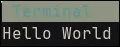
We successfully set up the environment making us ready to explore the code!
Thank you for reading!